Browser-native Radio Bench
Argus turns a cheap RTL-SDR dongle into a spectrum analyzer that runs entirely in your browser. Watch the waterfall, drag a box around any signal, and find out who's licensed to transmit there — then capture it, decode it, and get the info.
Plug in a dongle, open Chrome, hit Launch. No install · no drivers (on MacOS 😏) · no account.
Everything in one tab
No libraries, no building, no toolchain. Argus gives you a spectrum viewer, license lookup, decoder and capture tool — right in your browser.
Open Chrome and go. Argus talks to the dongle directly over WebUSB — no drivers, no native app, no account. It's just a web page, so it works the same on any machine and can run offline.
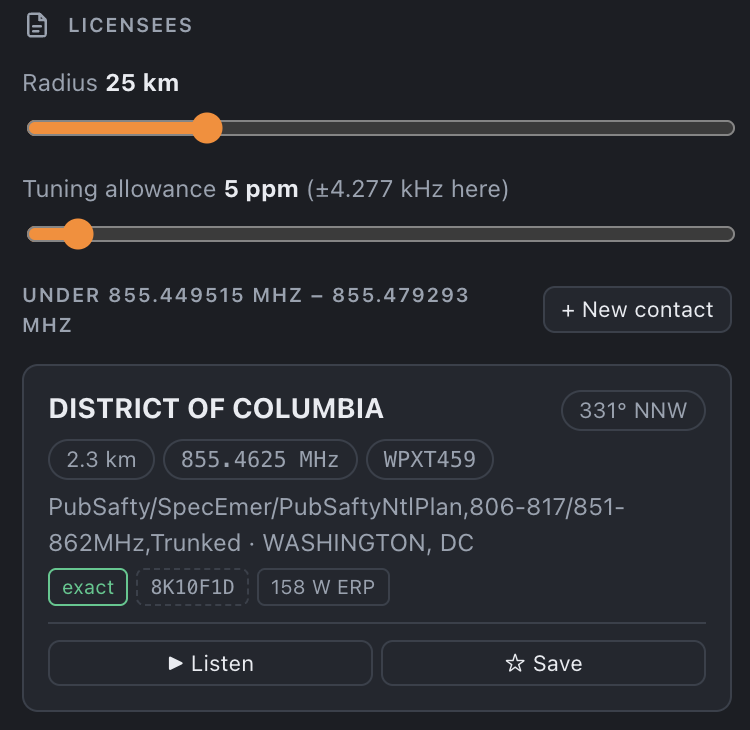
Drag a box over a signal and Argus queries a FCC license database — returning the licensee, call sign, emission, distance and true bearing. Nothing active? It falls back to expired licenses and tells you who was there.
Listen to NFM / WFM / AM audio, or run the demod chain end-to-end: pagers, ACARS, P25 trunking and 300+ wireless sensors turn back into text, right in the tab — mode and width auto-picked from the matched license.
Grab a slice of spectrum to disk as SigMF — the open IQ recording format — with all the metadata intact. Take it into GNU Radio, inspectrum, Universal Radio Hacker or your own scripts for deeper analysis.
Pair Argus with the Remote Capture agent and the SDR can live on another computer — a Pi in the attic, a receiver at a friend's house across the country. IQ streams to your browser over WebSocket; you drive it locally.
A color-coded FCC/NTIA allocation ribbon runs along the top, naming what every patch of spectrum is set aside for — amateur, aeronautical, broadcast, satellite, radiolocation — so you always have context.
Before you plug in
Chrome talks to the dongle over WebUSB, and each OS has its own way of handing over that access. It's a one-time setup — do it once and every future launch just works.
Nothing to install. Plug in the dongle, hit Launch, and click Allow when Chrome asks to connect to the USB device.
Just have the RTL-SDR driver installed. On Ubuntu, run sudo apt install rtl-sdr.
You may need to blacklist the dvb_usb_rtl28xxu kernel module if it auto-loads.
To do that just run echo "blacklist dvb_usb_rtl28xxu" | sudo tee /etc/modprobe.d/rtl-sdr-blacklist.conf and then reboot.
Dongles ship with a driver Chrome can't use for WebUSB. Run Zadig, pick the RTL-SDR device, and install the WinUSB driver — a two-minute, one-time swap.
Identify
That's the question Argus was built to answer. Select a signal on the waterfall and find out who it is licensed to. The FCC Allocation label is shown at the top - making it easy to see what the band is supposed to be used for.
Locate
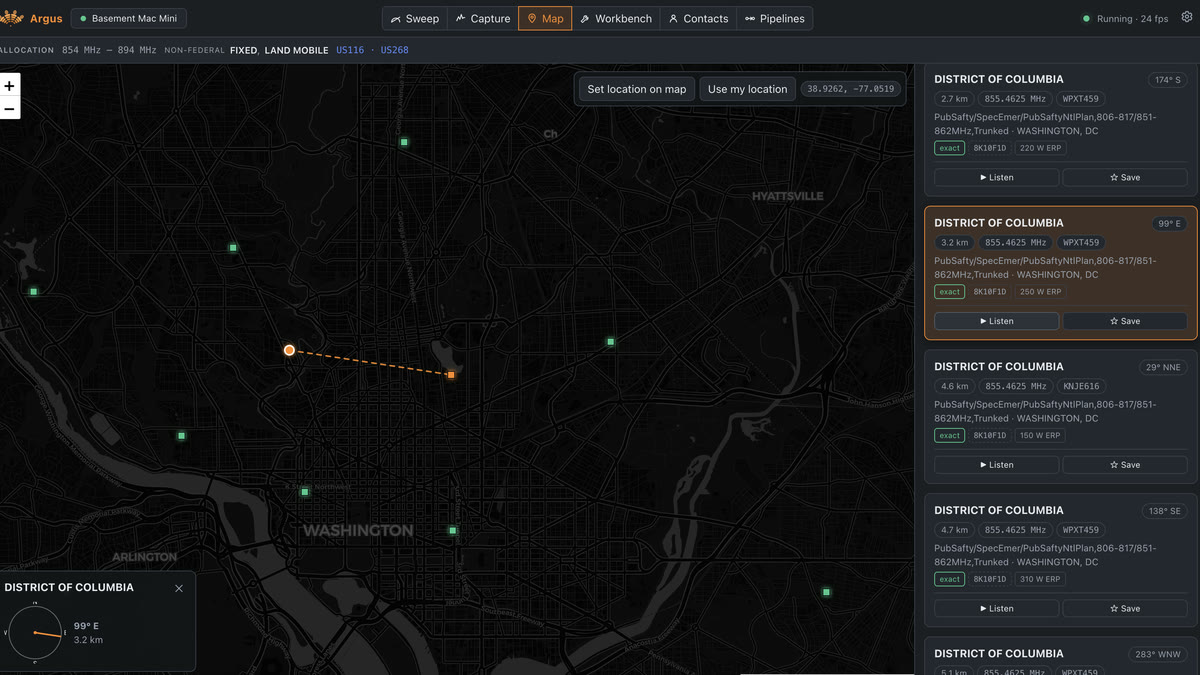
Every lookup that resolves to a licensed site drops a pin on a map, so you're not just reading a name — you're looking at the transmitter's real location relative to you. Argus draws the line between your position and the tower, not just answering "who's on that frequency" but also "...where is it coming from"
Decode
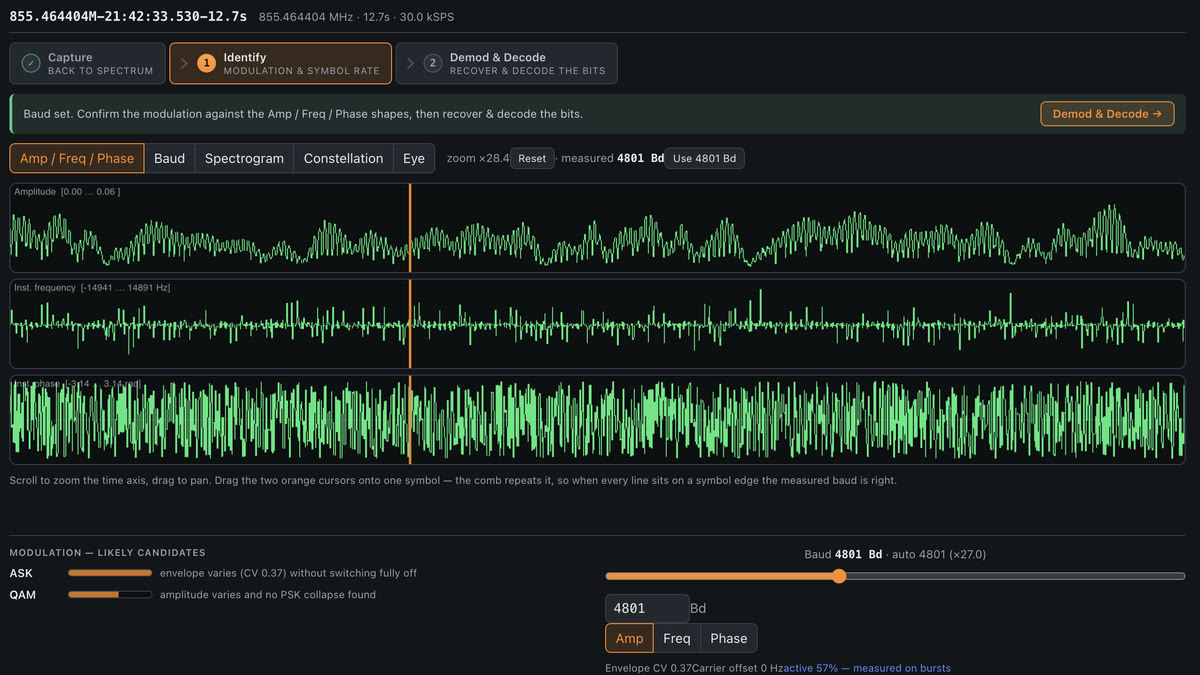
Beyond listening to audio, Argus has a real DSP workbench: capture a burst, inspect the spectrogram, constellation and eye diagram, and run purpose-built decoders. ... or dig in and build your own demod chain from the ground up, with a library of prebuilt blocks to choose from.
Prebuilt one-click chains include:
Capture & automate
Export a IQ segment for another tool using SigMF, or point a pipeline at a channel and walk away — every decoded message is aggregated and streamed to a folder as JSON.
Remote capture
The Remote Capture agent is a single small binary. Run it on a remote machine with an RTL-SDR dongle, point Argus to its address, and the IQ streams to your browser over WebSocket — as if the RTL-SDR were plugged in locally.
A standalone, dependency-free binary — no librtlsdr,
no rtl_tcp, nothing to install.
Grab the build for your platform, or compile it yourself.
Unix builds arrive without the executable bit — chmod +x argus-agent-* first.
Then start it on the receiver box: argus-agent --name "Attic Pi"
— and in Argus, choose Remote source and enter the address.
Serving Argus over HTTPS? Add --tls, or the browser will refuse the
connection.
Everything Argus does happens in the browser. Grab a dongle, launch the app, and start understanding the spectrum around you.
 Argus
Argus